Fog of War
The fog of war is a central feature in most RTS games. It limits player vision to the vision of their units and buildings, providing a layer of strategy in which players will try to gain information through scouting, using spell powers, and having map control of key points. Likewise, players will try to use their opponent's blind spots to launch secret attacks on their base or buildings, sorround their armies, etc.
In the RTS Framework, vision is calculated two times independently, for performance reasons. A first pass on the CPU will calculate logic vision, which will tell our gameplay code which entities are visible to the player, we'll use this information to hide/show unit and building meshes, play or freeze animations, etc.
A second pass in the GPU will calculate the actual visible fog, which is applied via a post-process material into the world to darken non-visible areas.
Even if vision is calculated two times, the logic for both is almost identical.
1. The vision grid
Vision is calculated and represented on the map as a 2D grid. Each cell will either be visible or not visible for a particular player.
We will start by getting the landscape (the actor that represents the actual map/level and geometry) and creating a grid over it. The size of the grid is configurable but performance tests suggests that 128x128 is a good size. The bigger the grid resolution, the more expensive all vision calculations become. Since it's a 2D system, it's size increases at a squared rate. A 128x128 grid has 16.384 cells. A 256x256 grid (two times bigger) has 65.536 cells. Therefore, keeping the grid resolution small will provide tangential performance results.
The GPU-calculated FoW is more performant, so we can afford to have a 256x256 grid there.
TODO: insert debug visualisation screenshot of level and grid
2. Vision bitmasks
In order to represent vision, we use bitmasks that are generated from team info. Each player has an index, and each team has an index as well. Since vision is granted per team,
we use the team index to generate a bitmask. In the constructor for the FRTSTeamInfo struct:
FRTSTeamInfo(int32 PlayerIndex, int32 InTeamIndex) : PlayerIndex(PlayerIndex), TeamIndex(InTeamIndex)
{
	TeamIndexBitmask = pow(2, TeamIndex);
}
The exponential function has the interesting effect of creating a bitmask in which only the selected value (in this case TeamIndex) bit is shifted, so for example:
- TeamIndex = 0:
Bitmask = pow(2, 0); // Bitmask is 1. The binary representation would be00000001(using an 8 bit representation for convenience, the real int is 32 bits in game so it supports more values). - TeamIndex = 1:
Bitmask = pow(2, 1); // Bitmask is 2or in binary,00000010. - TeamIndex = 3:
Bitmask = pow(2, 3); Bitmask is 8or in binary,00001000.
As you can see, the bit that shifts is the one corresponding to the team index, starting on 0. This is really useful because now we can have a single bit representing the player team vision.
Given an unique bit for each team, we can now perform bitwise operations on bitmasks to store and calculate vision.
For example, we can store a single int32 in the vision cell, that represents which players have vision over that cell.
We can use the bitwise OR operator(|) which will return 1 if any bit in the combination is 1.
const uint8 Team3Mask = pow(2, 3); // 8 or 00001000
const uint8 Team1Mask = pow(2, 1); // 2 or 00000010

const uint8 CombinedMask = Team3Mask | Team1Mask; // 00001010
Now we have a single int representing vision for both teams. In order to know if a team has vision over a cell,
we can use the bitwise operator AND (&) that will only return 1 if both bits are 1.
const uint8 Team2Mask = pow (2, 2); // 4 or 00000100

//Assuming CombinedMask is 00001010 as in the previous example:
const uint8 VisionResult = Team2Mask & CombinedMask; // 0 or 00000000 since none of the bits are 1 in the same position
If the vision result is 0, the cell is not visible by that player.
Computing vision
Now that we have a grid and a system to store per-player vision and know which teams can see which cell, we can proceed to actually compute the vision. We will loop through all units and buildings, and calculate a circle around them. This circle will be calculated as follows:
const int32 Top = FMath::Clamp(Location.Y - Radius, 0, FogOfWarSubsystem->LogicGridSize - 1);
const int32 Bottom =  FMath::Clamp(Location.Y + Radius, 0, FogOfWarSubsystem->LogicGridSize - 1);
const int32 Left =  FMath::Clamp(Location.X - Radius, 0, FogOfWarSubsystem->LogicGridSize - 1);
const int32 Right =  FMath::Clamp(Location.X + Radius, 0, FogOfWarSubsystem->LogicGridSize - 1);

for (int Y = Top; Y <= Bottom; Y++)
{
	for (int X = Left; X <= Right; X++)
	{
		const float DistanceSquared = FVector2D::DistSquared(Location, FVector2D(X, Y));
		if (DistanceSquared < Radius * Radius)
		{
			LogicVisionGrid[X][Y] |= TeamVisionBitmask;
		}
	}
}
After computing the vision, we know which players see which cells in the whole map, and can act in consequence.
Therefore, we're currently using a TQueue to store player bitmasks before combining them.
Computing entity visibility
Finally, we just need to ask the cell that units/buildings are in if the cell is visible by the player. If so, we will set their status to visible. Else, we'll set their status to invisible.
Buildings are an exception because they remain visible but un-animated after being seen:
// Get if building is currently visible
const int32 CurrentVisionResult = CombinedCornerVision & PlayerVisionBitmask;
// Get if building has been seen in the past by this player
const int32 ExploredVisionResult = PlayerVisionBitmask & Building->GetExploredBitmask();

// Store the current vision in the building, so that we can know if it has been seen previously
Building->SetExploredBitmask(CombinedCornerVision);

ERTSBuildingVisibilityStatus VisibilityStatus = NotVisible;

// Buildings remain visible once explored
if (ExploredVisionResult != 0)
{
	VisibilityStatus = Seen;
}

// Buildings seen in the past freeze their animations
if (CurrentVisionResult != 0)
{
	VisibilityStatus = Visible;
}

Building->SetVisibility(VisibilityStatus);
Visible vs Explored FoW
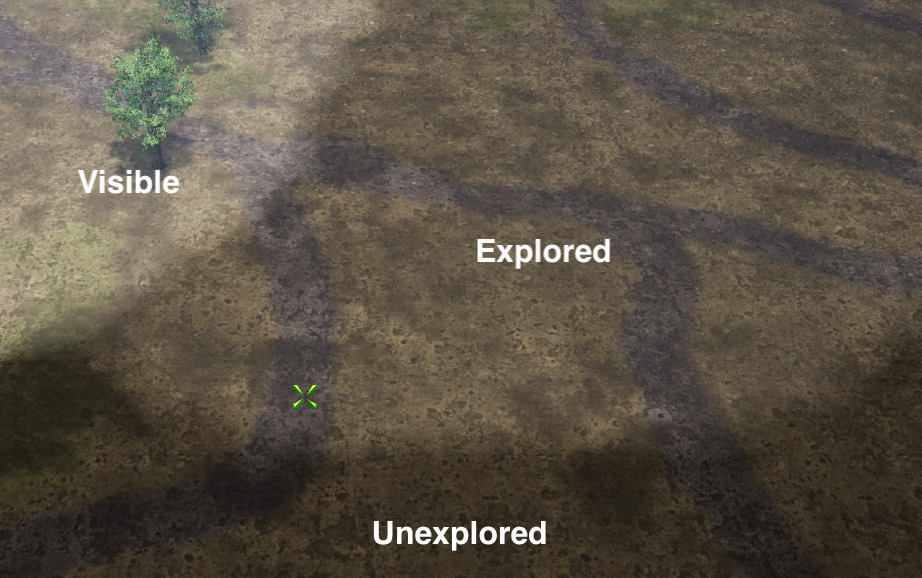
Unlike the original BFME games, and inspired by Starcraft2, we support two types of visibility statuses, which are only relevant for GPU computed FoW.
- Visible: Cells that are visible currently, in this frame. This value is reset and recalculated every frame.
- Explored: Cells that have been seen at some point by the player. This value is calculated every frame as well, but not reset. This allows players to understand which areas of the map they have already scouted or seen.